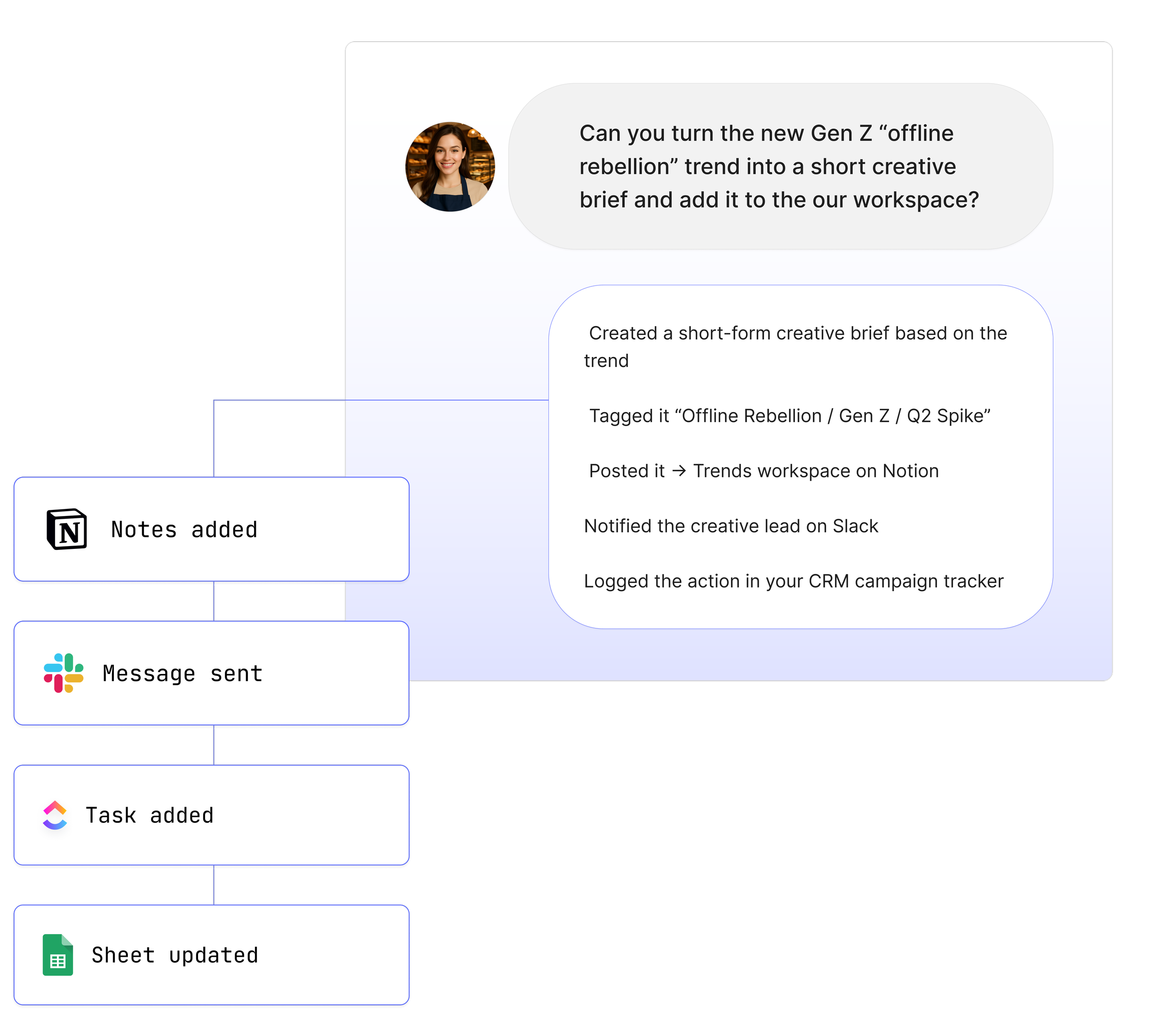
Maybe* uses multiple large language models behind the scenes. Our orchestration Agent selects the best one for each task. Gemini is one of the models we rely on when your work involves images, documents, charts, mixed media, or tasks that benefit from structured reasoning and broad web context.
You do not need to choose Gemini yourself. When your Agent sees a task that fits Gemini’s strengths, it will route the request there automatically.
How Maybe* Uses Gemini
Gemini is often chosen when your Agent needs to:
Work with multimodal inputs like PDFs, screenshots, images, or charts
Extract structured information from documents
Analyse visual content and blend it with text reasoning
Handle broad, general knowledge queries
Produce well-organised, step-oriented answers
Support tasks that mix research, reasoning, and interpretation
From your perspective, nothing changes. You still work in Slack, Teams, or your usual tools and say things like:
“@Maybe read this PDF and outline the main issues.”
“@Maybe analyse this screenshot and explain what it means.”
“@Maybe summarise this document and extract the key data into a table.”
Behind the scenes, the orchestration Agent may choose Gemini to handle that work.
Where Gemini Shines
Multimodal understanding
Strong at analysing images, screenshots, charts, and documents
Can blend visual and text-based reasoning
Good at extracting structured information from complex inputs
Use it for: document analysis, screenshot interpretation, form extraction, and design review.
Structured reasoning
Clear, step-by-step explanations
Good at producing organised outputs
Helpful for tasks that require logical ordering or breakdowns
Use it for: instructions, workflows, procedures, and onboarding materials.
General knowledge and research
Broad understanding of many real-world topics
Good for open-ended questions that need context
Strong factual grounding when summarising or explaining
Use it for: research shortcuts, conceptual explanations, and knowledge discovery.
Interpretation and data extraction
Reads PDFs, tables, and documents effectively
Finds key details without losing overall context
Converts unstructured content into organised formats
Use it for: audits, compliance documents, meeting packs, contracts, or reports.
Content creation
Helpful for clean, structured drafts
Supports long-form writing backed by clear reasoning
Stable performance for planning and outlining
Use it for: strategy docs, content briefs, planning materials, structured summaries.
Problem-solving across modalities
Combines image analysis, text reasoning, and search context
Supports tasks that involve both visual and textual inputs
Capable of interpreting multi-part instructions that span formats
Use it for: diagnosing visual issues, reviewing UI designs, and analysing diagrams.
Specialised strengths
Gemini stands out in the areas where multimodal understanding and structured reasoning matter most.
It is particularly strong at working with images, PDFs, and mixed content, allowing your Agent to interpret screenshots, forms, charts, and documents in a single request. This makes Gemini useful for teams that rely on visual workflows or need to extract information from complex materials.
Gemini is also skilled at producing organised, step-by-step output.
It explains ideas clearly, breaks down processes, and creates structured content your team can use immediately. Whether you are documenting a workflow or preparing instructions, Gemini provides clarity and consistency.
When the work involves broad knowledge or conceptual understanding, Gemini performs well.
It can blend reasoning with general context, making it a reliable choice for summaries, explanations, or research-style queries.
It also supports deep document analysis.
Gemini can read full PDFs, identify key points, and convert unstructured information into tables or lists. This allows your Agent to transform documents into usable insights without manual copying.
These strengths become even more powerful when paired with your existing tools. Your Agent can use Gemini to analyse images, extract insights from PDFs, and update Google Docs, Sheets, Notion, ClickUp, or Slack with structured results that fit your workflow.
How Gemini Works With Other Models
Gemini does not work alone inside Maybe*. It is one of several models your Agent can choose from. The orchestration layer watches the task you give it and decides which model is the best fit. Gemini is often selected when the work involves multimodal content, document extraction, or tasks that benefit from structured reasoning.
Your Agent can also use Gemini as a complementary model. It may handle the visual or extraction elements while another model manages deeper reasoning or writing. This allows Maybe* to combine strengths across models for more accurate and complete results.
Sometimes the task requires visual understanding. Sometimes it needs long context. Sometimes it needs careful reasoning. Gemini is chosen when the work depends on interpreting images, documents, or structured tasks.
From your perspective the process stays simple. You speak to @Maybe in Slack, Teams, or your workspace. You do not choose the model. You do not manage prompts. Maybe* selects Gemini when it is the right tool for the job and handles everything behind the scenes.
See How Teams Like Yours Are Using Maybe* Integrations

About Maybe*
Maybe* connects to the systems your team relies on every day so AI can handle real work end to end. Use Maybe* directly, or from Slack or Microsoft Teams. Wherever you work, our AI Agents bring the right context, take the right actions, and keep workflows moving.
Powered by our patent pending AI Agent Builder and orchestration layer, Maybe* chooses the right model and the right integration for each task. You do not need to configure prompts per model or build complex routing.
Begin with a single AI Agent and a few key tools. Add more models and integrations as you grow. Maybe* expands from simple automations to fully orchestrated, cross tool workflows.